Ancient Star
Development log
Project maintained by iktools Hosted on GitHub Pages — Theme by mattgraham
Music
by Ivan Kravarščan
And the first thing I did since the last post was to plug in the music. Yeah, I addressed settings too but music first. The first read on how to implement it got me a little bit worried, I had to choose an audio library, mind which features are available, and mind the memory management. Kind people on LibGDX Discord gave me enough pointers to get going and after a bit of experimentation I got a logic that plays music files one after another, and hopefully won’t crash during long play sessions. There was a funny incident where the music would keep playing on Android after you switched to another app, and a less funny issue where coming back to the game would play a different track on top of the currently running one.
Now it’s up to assembling the soundtrack. I’ve started with it early, a few years ago, and now that I listen to the whole playlist more carefully I see some issues. I got a few tracks that are a variation on the theme so I’m inclined to select only one variant and drop the rest. And I should try to find a few more tracks because the list is a bit thin after filtering it.
Settings
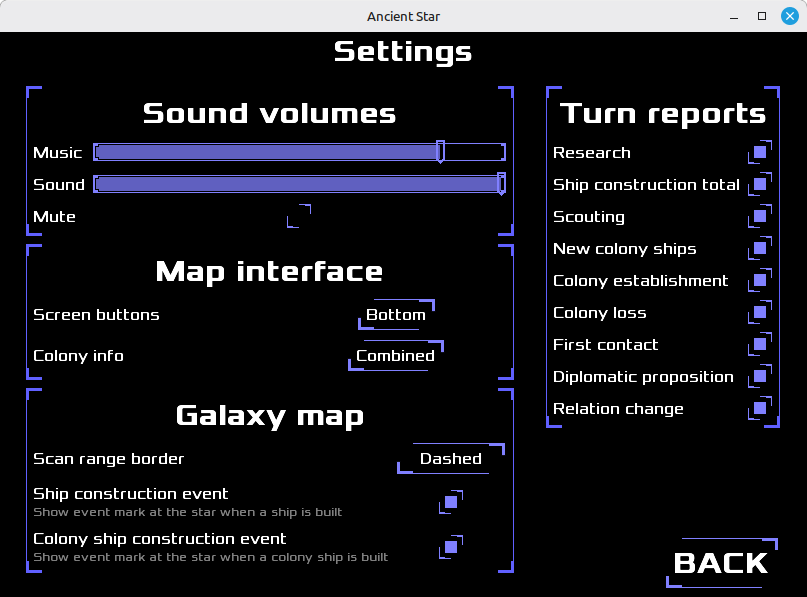
At first the settings screen was a matter of doing copy-paste-modify a lot. Then the bulk of the work revealed itself: the polish phase. This screen involved styling a good number of UI components: dropdown menus, checkboxes, scrollbars, and sliders. I really like how checkboxes look now. Sliders could use more work, they are almost where I want them to be but not quite there.
Then I circled back to music, to make volume sliders and mute button work. This also revealed a nasty surprise, that settings are getting saved only partially. Speaking of saving, I’m still on the fence when that save should happen. I could add this or that logic that saves immediately when an individual setting is changed but the only realistic user for it is me, a jerk who opens the game directly in the settings screen and crashes it instead of exiting nicely.
And final thing about the setting screen, it looks too empty. The image here is when the window is resized to nicely encapsulate the UI but imagine it on the full screen windows. There is content for only 1/3rd of it, and I have no idea how to fill it. I could make everything larger but I don’t like that approach. So the idea I was pondering is to make it a dialog for the desktop build. On the phone all screens are effectively enlarged so settings will fill the screen nicely. With the way the code is structured it’s really easy to remix it this way and keep all the functionality in both cases. The added benefit of making it as dialog is that it can also be available in the game screen too, without the need for screen switching back and forth.
tags: